
What shipped in May.
Two big releases went out this month. Below is what changed and what it means for you, written for humans who do not live in code.
01The headline: Skills
Agents now have Skills. A Skill is a tool the agent can pick up when it needs to do a specific job. Examples already in production: writing a LinkedIn post, running a fact-check, drafting a brand-safe image prompt.
Until now, you trained the agent by stuffing more and more instructions into one giant brief. More words in, slightly better output out. The brief became a bloated document that tried to do everything and ended up doing nothing well.
Skills change the shape of that. Each Skill is its own tool, self-contained, focused on one job, tested before it ships. The agent does not have to hold the entire brief in its head. It opens the toolbox, picks the right tool for the moment, and uses it.
The practical effect: cleaner work, faster iteration, and a system that gets stronger every time we add a tool, instead of buckling under the weight of one long prompt.

02Documents the agent can now create
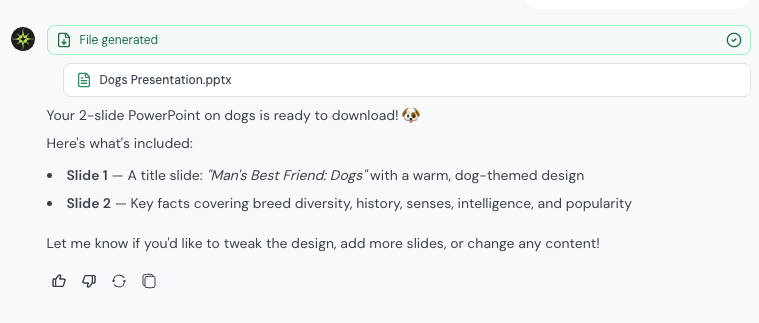
Skills brought real production muscle with them. The agent can now generate:
presentations.pptx
documents.docx
spreadsheets.xlsx
Ask for a one-pager, a pitch deck, a campaign brief, or a budget tracker. The agent builds the file and hands you the download. No more copy-pasting from chat into a blank doc and reformatting for an hour.
03Image generation got an upgrade
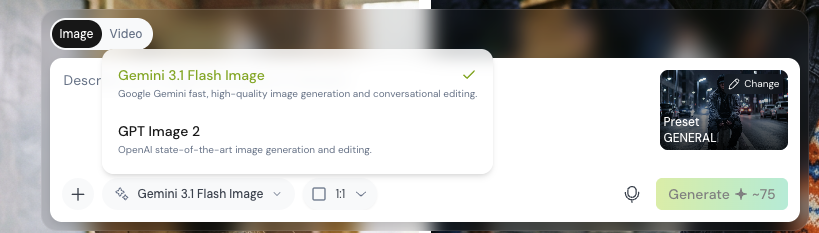
The image generation form has a model dropdown. Pick the model that fits the shot you want. Faster iteration, better fit for the brief.
04Fact-checking inside the chat
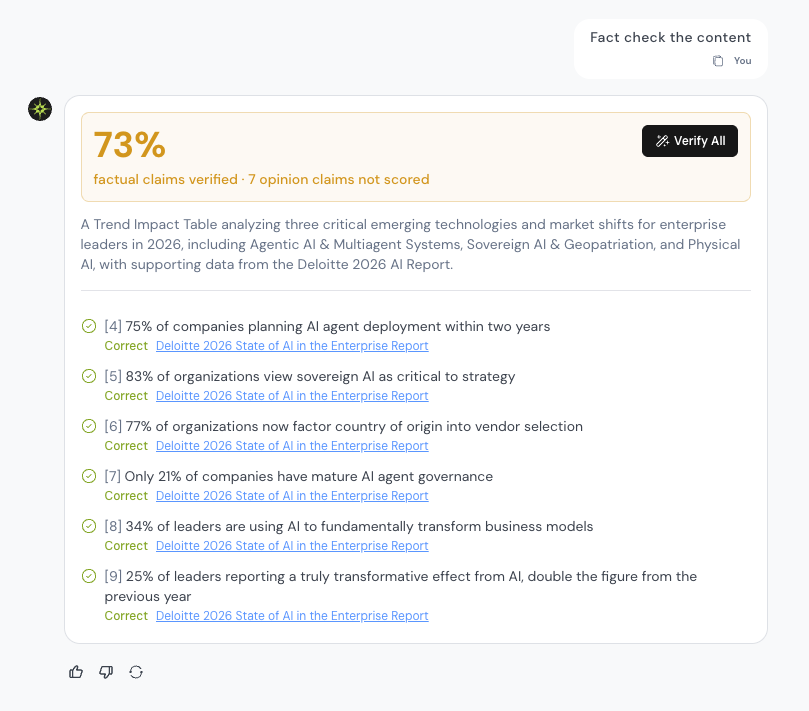
Score Check and AI Buttons now fold fact-check responses straight into the conversation. Run a check, see the result inline, keep moving. The score card handles missing data gracefully, so it never breaks the flow.
05Workspaces are now link-based
The workspace in the link is the source of truth. That gives you:
- Shared links that land in the right workspace every time.
- A clear dialog when you switch org or workspace, instead of a stale screen.
- Cross-tab awareness. Change workspace in one tab, your other tabs notice and stay in sync.
06Reliability fixes you will quietly appreciate
- "Try Again" on a hard error actually recovers now.
- Logging out clears any half-finished payment state, so checkout stays clean.
- Sign-in popups that close without finishing no longer leave the app confused. Connected accounts refresh on every entry point.
- We now capture your full session from the moment the app loads.
- Team management tabs no longer drag stale settings around when you navigate.
- Spelling fix in the writing style options: Les Binet is finally spelled correctly. Sorry, Les.
07Behind the scenes
Agents can now work with files in shared cloud storage. Skills are saved as locked snapshots, so once published they never quietly change underneath you. Sign-in checks read your latest credentials every time, which means fewer "please log in again" moments. You will not see any of this directly. You will feel it as a product that holds up under pressure.
Use it, break it, tell us where it hurts.
Preview 20 May 2026