
The work starts doing itself.
This release introduces Automations, work that runs on its own schedule and shows up finished, waiting for your approval. You also get every major AI model in one menu, and Skills you can attach yourself. Here is what shipped, written for humans who do not live in code.
01The big one: Automations
Some work is the same every single week. The Monday content roundup, the monthly performance summary, the post that goes out every Friday at nine. You know how to do it. You just should not have to keep doing it by hand.
Automations take that work over. Describe the job once, in plain words, the way you would brief a colleague. Pick when it should run, on a schedule you set, in your own timezone, or whenever something specific happens. From then on, the automation does the work and brings you the result.
You stay in charge. Every run arrives as a draft first, and nothing goes out into the world until you say so. Read it, tweak it, approve it. And here is the part we love: the automation pays attention to your edits. Change the draft before approving and the next run starts closer to what you actually wanted. It gets better at the job the longer it holds it.
What that gives you:
- Runs on your clock. Daily, weekly, monthly, whatever rhythm the job needs, in your timezone, not a server's.
- Or runs on a trigger. Point an automation at an event and it springs into action the moment that event happens.
- Drafts first, always. Every run waits for your approval before anything is published or sent.
- Learns from your edits. Corrections you make carry forward, so run five is sharper than run one.
- Remembers across runs. Each run knows what the previous ones did, so the Friday post never repeats the Tuesday one.
- Tells you when it is done. A note lands in your inbox when a run finishes, so you never have to go check.
- Yours, or your team's. Keep an automation personal, or share it with teammates as viewers or editors.
- Start from a template. Common jobs come ready to use, so your first automation takes minutes, not an afternoon.
02Every major model, one menu
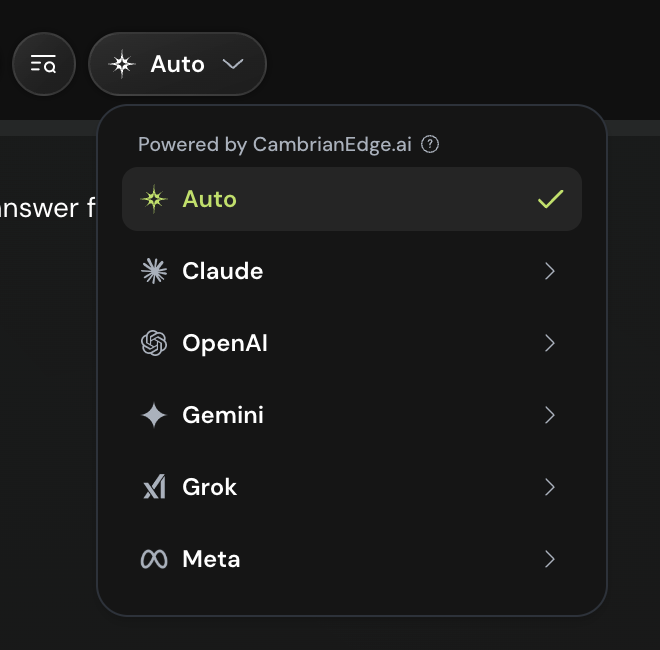
The best model for a legal summary is not the best model for a punchy caption. So we stopped making you choose one family and live with it. CambrianEdge now carries the full lineup: Claude, OpenAI, Gemini, Grok, and Meta, with the individual models from each family a click deeper.
Leave it on Auto and the platform picks the right model for the task at hand. Have a favorite for a certain kind of work? Open the menu and choose it yourself. Either way, when the labs ship a new model, it lands here.
03Skills are now in your hands
In May we gave the agent Skills, a toolbox of focused, tested tools it reaches into when a job calls for one. The agent chose the tool. You watched.
Now the toolbox is yours too. You can browse the Skills in your workspace, see exactly what each one knows, and attach a Skill to a conversation or an automation yourself. Attach your brand voice Skill to the weekly newsletter automation and every issue comes out sounding like you. Attach your design Skill and the decks and documents it produces follow your taste, without you repeating the brief every time.
04Also in this release
You can now share a conversation or a single document with a public link, so work made inside CambrianEdge can be shown to anyone, whether or not they have an account. Social publishing got a rebuild under the hood and posts flow to your connected accounts more reliably. And sign-in, syncing, and generation all picked up speed while nobody was looking.
Set up one automation this week. Next Monday, notice what you did not have to do.
Stable 21 July 2026